
Summary
This page explains how to view and edit individual General Ledger (GL) accounts, manage account visibility by location, and make bulk GL account updates through upload templates. It also documents the fields, required values, and rules for the GL Location Visibility and General Ledger Accounts templates.
View and Modify General Ledger Account Settings
-
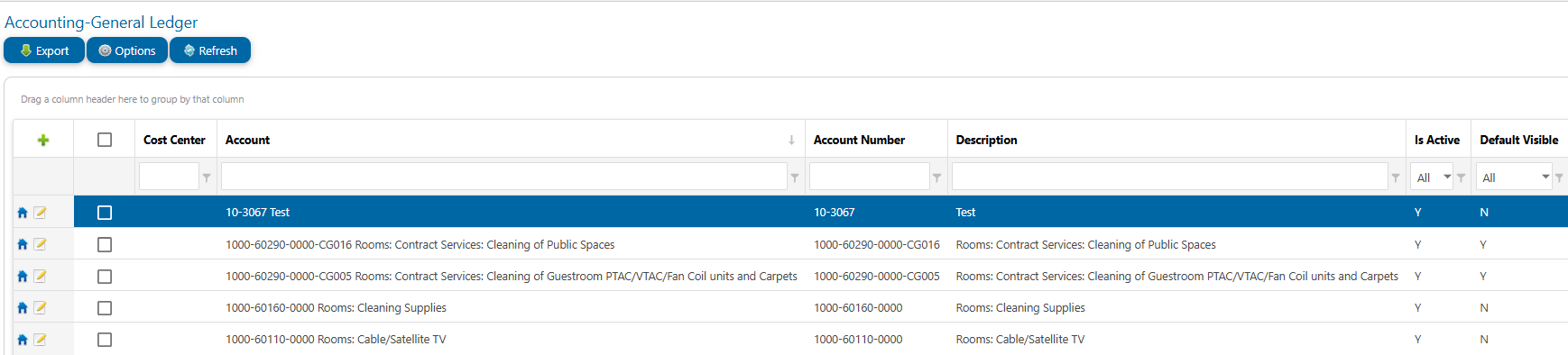
Navigate the top drop-down menu to View > Accounting > General Ledger
-
The full list of GL Accounts will be visible with search fields available for Account Number and Description
-
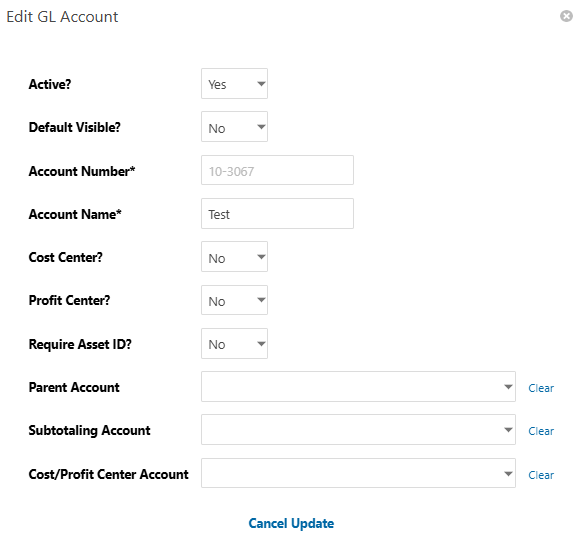
Click the pencil icon

-
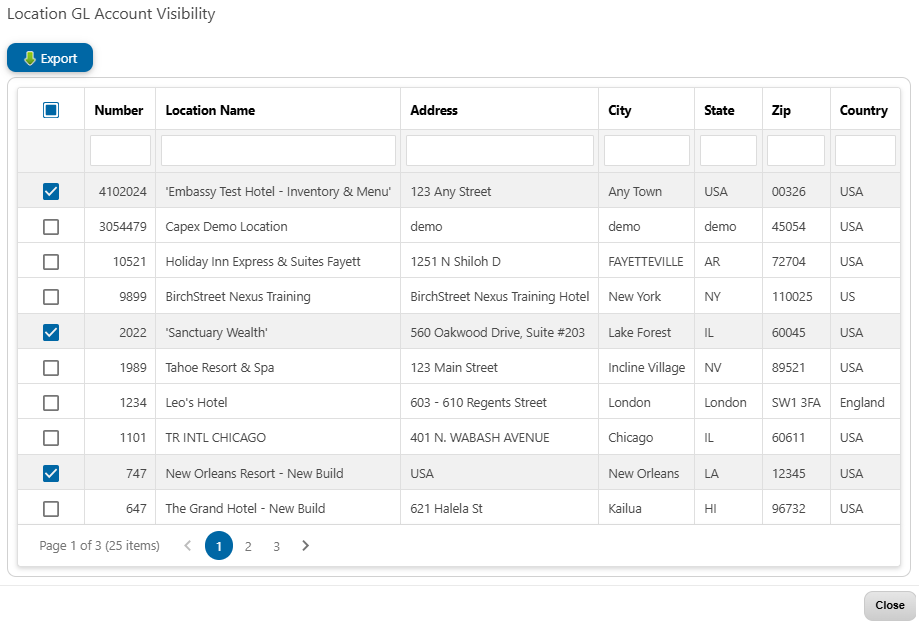
Click the Home icon

-
Check/uncheck boxes for location(s) that need/don't need visibility to the GL Account.
|
Field |
Details |
|---|---|
|
Active Y/N |
Active Y/N |
|
Default Visible Y/N |
Default Visible Y/N |
|
GL Account Name |
GL Account Name |
Note: GL Account Numbers cannot be edited in the GUI. Changes must be requested in a support ticket.
Insert and Update General Ledger Accounts Using Uploads
-
Navigate to Tools > Uploads
-
Upload Content to EPRO > Advanced Mode
-
Select the drop down for all upload template options
-
Choose the desired template, click "Download import template"
-
Enter the data in the required and optional fields as needed. See specific template details below.
-
Save the file > Browse and select file > Upload
-
Review and resolve validation errors; export messages if needed.
-
Click Import to perform the action stated in the validation message.
-
If needed, verify the work by navigating to the Accounting — General Ledger screen.
Template name: GL Location Visibility
This template updates GL Account visibility to specified locations.
Template Field Description
|
NAME |
TYPE |
MAXIMUM_LENGTH |
REQUIRED |
COMMENTS |
|---|---|---|---|---|
|
GL Account Number |
Alpha |
25 |
Y |
GL Account Number along with Location Name identifies the Location/GL Account Number record to update. |
|
Location Name |
Alpha |
40 |
Y |
Location Name along with GL Account Number identifies the Location/GL Account Number record to update. |
|
Cost Center Account |
Alpha |
25 |
N |
Cost Center Account can be used along with GL Account Number to uniquely identify a GL Account Number. |
|
Hide YN |
Alpha |
1 |
N |
Hide YN should be either Y to hide the GL account or N to display the GL account. |
|
Master GL Account Number |
Alpha |
25 |
N |
Master GL Account Number can be used along with GL Account Number to uniquely identify a GL Account Number. |
Template name: General Ledger Accounts
This template inserts and/or updates GL Accounts with Number and Description.
Template Field Description
|
NAME |
TYPE |
MAXIMUM_LENGTH |
REQUIRED |
COMMENTS |
|---|---|---|---|---|
|
GL Account Description |
Alpha |
255 |
Y |
Description of GL Account. |
|
GL Account Number |
Alpha |
25 |
Y |
If GL Account Number exist it will be updated, if it does not exist it will be created. |
|
Active YN |
Alpha |
1 |
N |
Active YN marks the record as active/inactive. Valid values are Y or N. |
|
Cost Center Account |
Alpha |
25 |
N |
Cost Center Account can be used to uniquely identify a GL Account Number. Cost Center Account will set or update the Cost Center Account for the given GL Account Number. |
|
Cost Center YN |
Alpha |
1 |
N |
Cost CenterYN can be used to help uniquely identify a GL Account Number. Cost Center YN will set or update the Cost Center YN flag for the given GL Account Number. Valid values are Y or N. |
|
Default Visible YN |
Alpha |
1 |
N |
|
|
Master GL Account Number |
Integer |
|
N |
Master GL Account Number can be used to help uniquely identify a GL Account Number. |
|
New Master GL Account Number |
Integer |
|
N |
New Master GL Account Number will set or update the Master GL Account Number for the given GL Account Number. |
|
Profit Center YN |
Alpha |
1 |
N |
Profit Center YN will set or update the Profit Center YN flag for the given GL Account Number. Valid values are Y or N. |
|
Require Asset Id YN |
Alpha |
1 |
N |
|
|
Subtotal To Account |
Integer |
|
N |
|