
Release
Current sprint window: –
This client-facing readout summarizes the work completed or nearing release in the
Release-ready improvements
-
Reporting and analytics
-
Expanded scheduled reporting so report emails can be sent to multiple recipients.
-
Improved Item Level Spend with Receiving reporting.
-
Added item-category detail to the Stock Movement report.
-
Improved AP Import Failures filtering.
-
Updated Accrual Report reference information.
-
Added Inventory Category Totals by Location reporting.
-
-
Inventory and receiving
-
Corrected inventory entry reversals in waste reporting.
-
Resolved total-count calculation issues.
-
Improved support for non-whole inventory increments.
-
Corrected tax display behavior during receiving.
-
Fixed GL summary calculation defects.
-
-
Procurement and requisitions
-
Improved requisition tax entry and tax amount toggle behavior.
-
Updated duplicate reference handling for purchase orders.
-
Refined punchout tax behavior.
-
Resolved purchase order upload defects.
-
Improved Accounts Payable dashboard quick-link security behavior.
-
-
Supplier and integration delivery
-
Advanced integration work across beverage and foodservice workflows.
-
Continued progress on distribution and GPO workflows.
-
Improved finance integration support for connected back-office processes.
-
Detailed highlights
These new features are off by default, so each customer must enable them.
PO Prediction
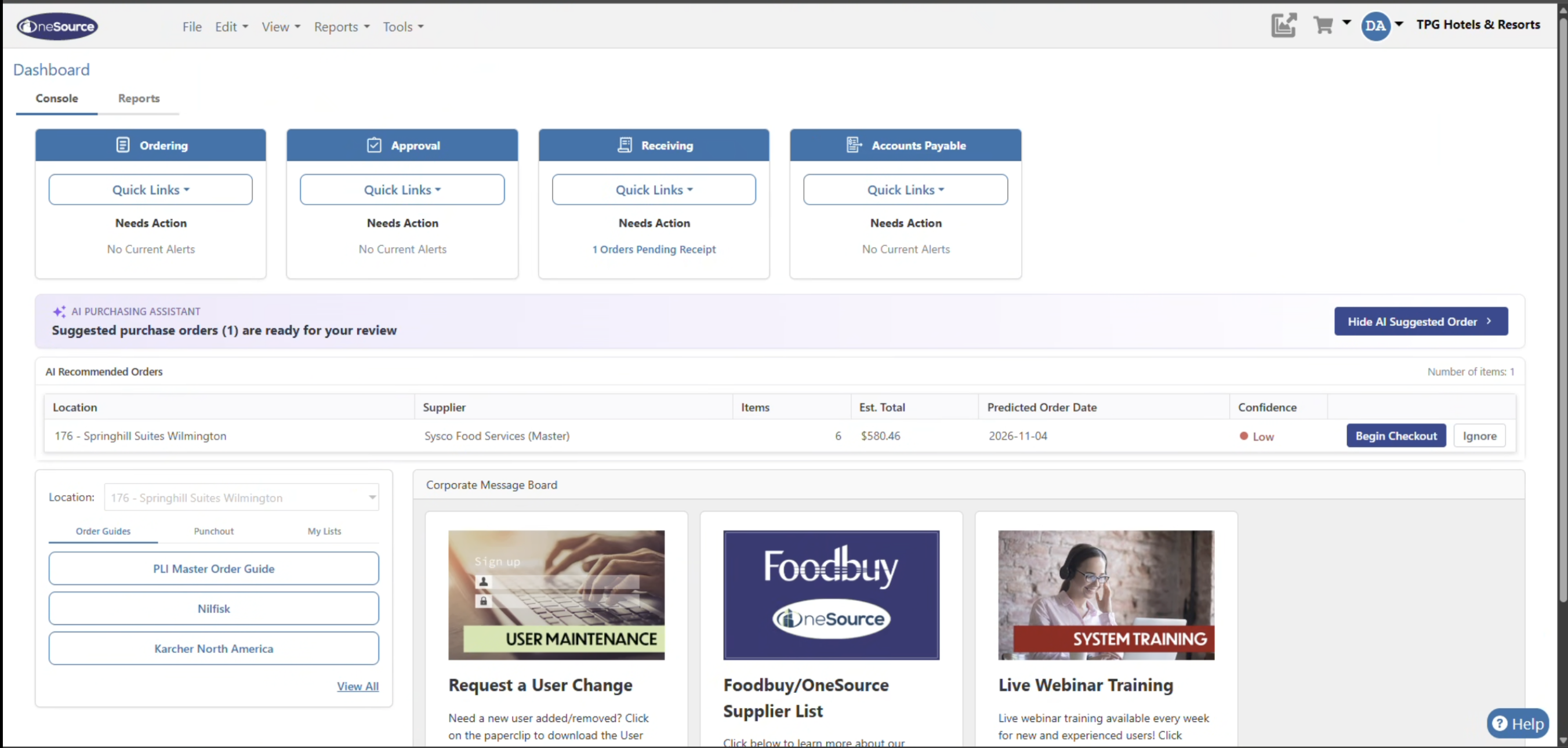
AI-suggested purchase orders that help teams move faster from need to checkout.
-
What users will see: When suggested draft purchase orders are available, a banner appears above the orders table on the Dashboard Console.
-
How it works: Nexus uses prior consumption, supplier lead times, and seasonal demand to recommend draft POs.
-
Buyer control: Users can review suggestions, accept all items, remove items, or adjust quantities before checkout.
-
Checkout flow: Totals update as edits are made, then orders continue through the standard checkout experience.
-
Approval handling: Orders within allowance are approved and sent automatically; orders over allowance move to the approval queue.
Contracted item flags
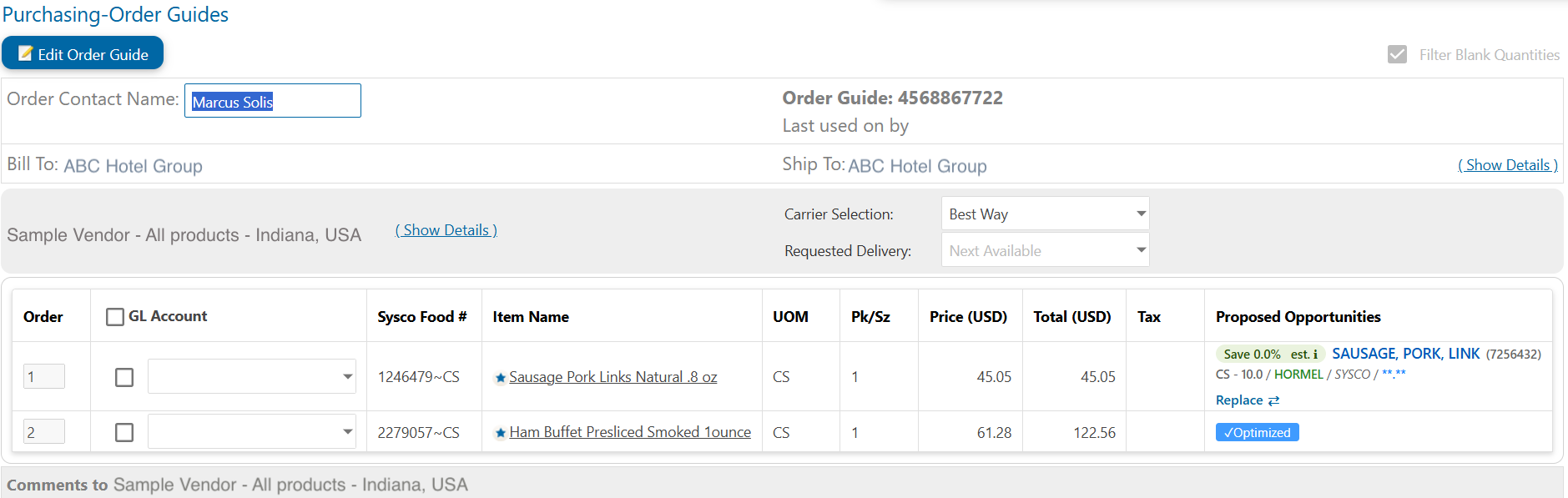
Clear purchasing-agreement visibility before users place an order.
-
What users will see: A “Contracted” Yes/No column can appear in catalog search, order guides, the cart, and PO details.
-
Refresh timing: Contracted-item status is refreshed once a day for suppliers with compliance data configured.
-
Ordering support: The flag helps users identify compliant items earlier in the ordering process.
-
New items: Newly added items may show a blank status until the next daily refresh is complete.
-
Administration: Administrators enable the column in Buyer Corporate settings and then turn it on for each order guide; supplier-pushed guides inherit the supplier setting.
In final testing
-
Global Tax Code readiness: Tax Code Catalog filtering and stored-stage tax estimates are in QA, supporting broader Global Tax Code rollout readiness.
-
Finance and ERP integrations: Work progressed across finance, AP, vendor master, supplier, reporting, and ERP integration workflows.
-
Stability and performance: QA is underway for an application stability issue caused by advanced Excel uploads with values over 128 characters.
-
Analytics enhancements: Vendor Property Detail Report parameter support and default vendor setting improvements are in QA.
Recently closed client work
-
Closed operational and client-support requests including vendor deactivation, order guide audits, supplier file transmission updates, missing file investigations, PO cleanup requests, order guide updates, and catalog/admin setting enablement.
-
Closed modernization and platform tasks including ERP API modernization and Vendor Upload Template country/currency safeguards.